Fixing Performance Issues in Tinypic - Part 2: Web Workers, Virtualization, and Bounded Queues
In Part 1 of this series, we performed a deep forensic autopsy on Tinypic when processing large image batches (300+ images, 240+ MB).
We uncovered four fatal performance bottlenecks that brought modern desktop and mobile browsers to their knees:
- Unbounded Memory Pressure: Every 48 MP smartphone image unpacked into ~192 MB of uncompressed RGBA pixel buffers during canvas drawing, causing hundreds of megabytes of garbage collection churn.
- Main-Thread Gridlock: Decoding and encoding images directly on the UI thread locked the browser event loop, pinned CPU cores at 99.3%, and froze animations at 0 FPS.
- DOM Tree Saturation: Generating a standalone card for every dropped file ballooned the document to 14,082 DOM nodes, forcing massive recalculate-style and layout passes.
- Asynchronous Lifecycle Leaks: Unbounded Promise.allSettled executions flooded memory, while premature URL.revokeObjectURL calls broke downloads with cryptic Failed - Network Error alerts.
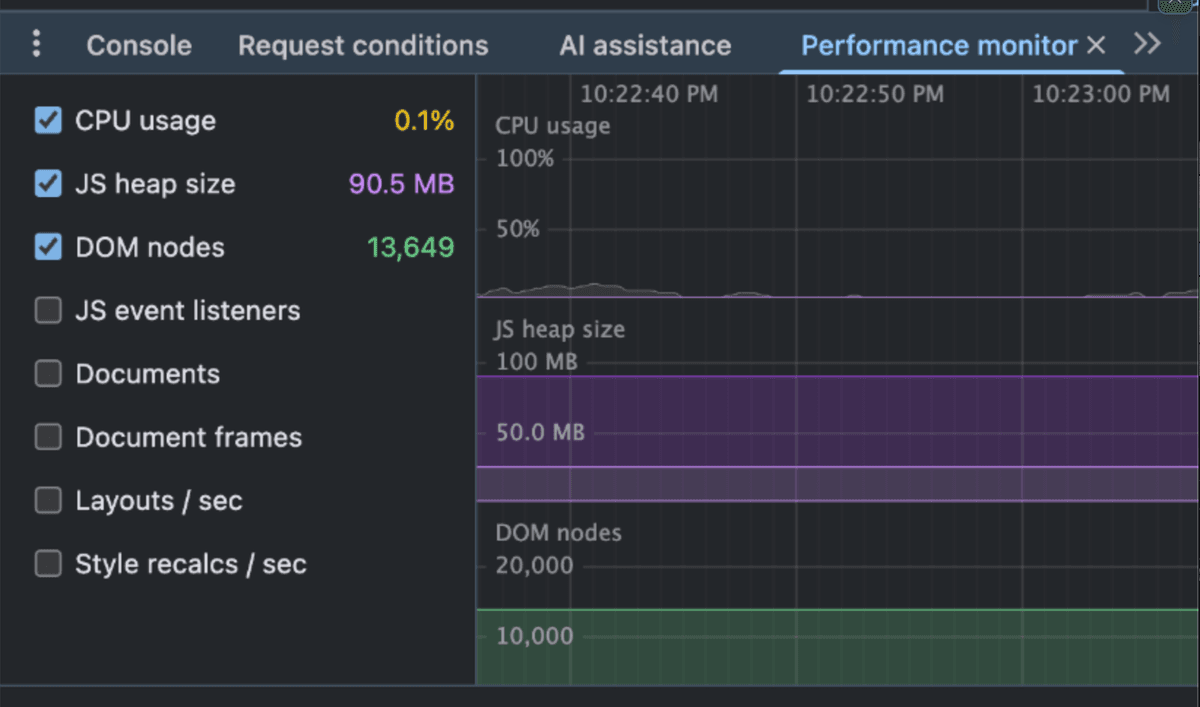
Figure 1: Chrome Performance Monitor showing the memory plateau and GC churn after batch processing before our architectural overhaul.
In this post, we explore the complete re-architecture that transformed Tinypic into a robust, high-throughput client-side processing pipeline.
1. The Architectural Blueprint
To solve these compounding bottlenecks, we rebuilt Tinypic around four core pillars:
- Off-Thread Multithreading: Moving 100% of image decoding, canvas manipulation, and compression into a dedicated Web Worker utilizing OffscreenCanvas.
- Bounded Concurrency Queue: Implementing an AsyncQueue with strict concurrency limits to eliminate microtask flooding and GPU texture starvation.
- DOM Virtualization: Windowing the card list with @tanstack/react-virtual so that only 5 to 8 visible cards (~180 DOM nodes) exist in the document tree regardless of batch size.
- Deterministic Lifecycle & Download Management: Eliminating inline Object URL leaks, preventing premature blob revocation, and orchestrating synchronized batch .zip generation.
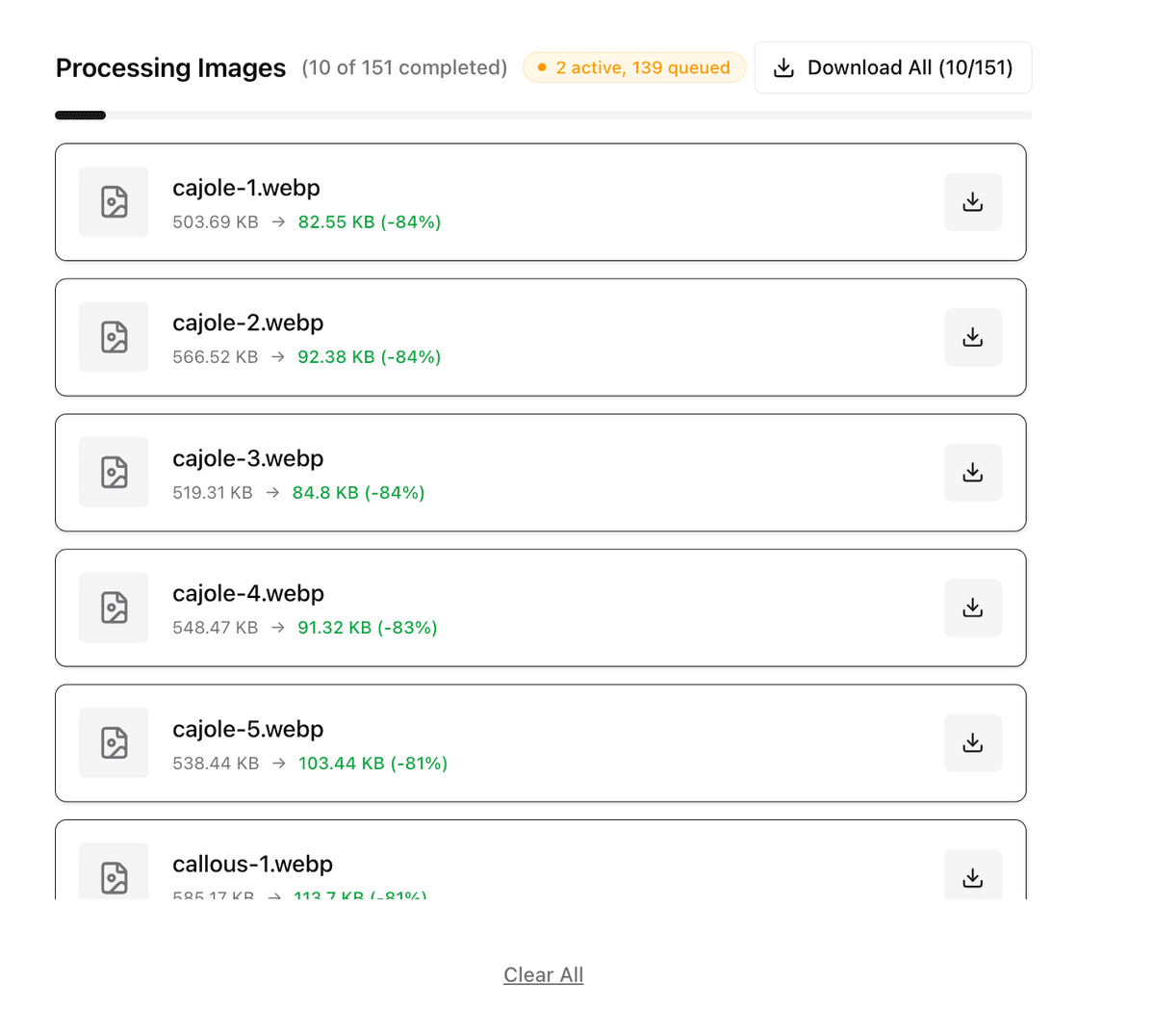
Figure 2: The redesigned processing experience with real-time status indicators, bounded worker queues, and virtualized card rendering.
Let us walk through each pillar and inspect the implementation details.
2. Pillar 1: Off-Thread Image Compression with Web Workers and OffscreenCanvas
In Part 1, we showed that decoding a single 48-megapixel photo unpacks into ~192 MB of uncompressed 32-bit RGBA pixel memory (8,000 x 6,000 x 4 bytes). Running Canvas 2D operations on the main thread blocks user interactions, scroll events, and UI animations.
To keep the UI running at a silky 60 FPS, all pixel manipulation had to move off the main thread.
The Web Worker Architecture
Web Workers do not have access to the window or the DOM, but modern browsers provide OffscreenCanvas and createImageBitmap, which operate seamlessly inside worker scopes:
Main Thread (React UI)              Web Worker (Background Thread)
+-----------------------+           +-----------------------------+
| User drops 300 files  |           |                             |
| AsyncQueue dispatch   |           |                             |
| postMessage(file, ...) ------>    | onmessage:                  |
|                       |           | 1. createImageBitmap(file)  |
|                       |           | 2. Downscale dimensions     |
|                       |           | 3. OffscreenCanvas draw     |
|                       |           | 4. Iterative convertToBlob  |
|                       |           | 5. Probe MIME & Fallback    |
| UI remains 60 FPS     |           | 6. Transfer Blob back       |
| onmessage(result)     |<--------- | postMessage(compressedBlob) |
+-----------------------+           +-----------------------------+
Main Thread (React UI)              Web Worker (Background Thread)
+-----------------------+           +-----------------------------+
| User drops 300 files  |           |                             |
| AsyncQueue dispatch   |           |                             |
| postMessage(file, ...) ------>    | onmessage:                  |
|                       |           | 1. createImageBitmap(file)  |
|                       |           | 2. Downscale dimensions     |
|                       |           | 3. OffscreenCanvas draw     |
|                       |           | 4. Iterative convertToBlob  |
|                       |           | 5. Probe MIME & Fallback    |
| UI remains 60 FPS     |           | 6. Transfer Blob back       |
| onmessage(result)     |<--------- | postMessage(compressedBlob) |
+-----------------------+           +-----------------------------+
The Worker Implementation
In our dedicated worker script (public/workers/compression.worker.js), we listen for compression jobs, decode the file off the main thread, and run our iterative quality loop on an OffscreenCanvas:
// public/workers/compression.worker.js
self.onmessage = async (e) => {
  const { id, file, options } = e.data;
  const {
    targetSizeKB = 200,
    minQuality = 0.5,
    maxQuality = 0.9,
    maxDimension = 2048,
    fileType = 'image/webp'
  } = options || {};

  try {
    // 1. Decode bitmap off the main thread
    let imgBitmap = await createImageBitmap(file);

    // 2. Downscale dimensions if exceeding threshold
    let { width, height } = imgBitmap;
    if (width > maxDimension || height > maxDimension) {
      const ratio = Math.min(maxDimension / width, maxDimension / height);
      width = Math.round(width * ratio);
      height = Math.round(height * ratio);
    }

    // 3. Setup OffscreenCanvas
    const canvas = new OffscreenCanvas(width, height);
    const ctx = canvas.getContext('2d');
    ctx.imageSmoothingEnabled = true;
    ctx.imageSmoothingQuality = 'high';
    ctx.drawImage(imgBitmap, 0, 0, width, height);
    imgBitmap.close(); // Immediately release uncompressed bitmap buffer

    // 4. Binary search / iterative quality loop
    let low = minQuality;
    let high = maxQuality;
    let bestBlob = null;
    let iterations = 0;
    const maxIterations = 5;

    while (low <= high && iterations < maxIterations) {
      const mid = Number(((low + high) / 2).toFixed(2));
      const blob = await canvas.convertToBlob({ type: fileType, quality: mid });

      if (blob.size / 1024 <= targetSizeKB) {
        bestBlob = blob;
        low = mid + 0.05; // Try higher quality
      } else {
        high = mid - 0.05; // Target size exceeded, reduce quality
      }
      iterations++;
    }

    self.postMessage({ id, success: true, blob: bestBlob, ... });
  } catch (err) {
    self.postMessage({ id, success: false, error: err.message });
  }
};
// public/workers/compression.worker.js
self.onmessage = async (e) => {
  const { id, file, options } = e.data;
  const {
    targetSizeKB = 200,
    minQuality = 0.5,
    maxQuality = 0.9,
    maxDimension = 2048,
    fileType = 'image/webp'
  } = options || {};

  try {
    // 1. Decode bitmap off the main thread
    let imgBitmap = await createImageBitmap(file);

    // 2. Downscale dimensions if exceeding threshold
    let { width, height } = imgBitmap;
    if (width > maxDimension || height > maxDimension) {
      const ratio = Math.min(maxDimension / width, maxDimension / height);
      width = Math.round(width * ratio);
      height = Math.round(height * ratio);
    }

    // 3. Setup OffscreenCanvas
    const canvas = new OffscreenCanvas(width, height);
    const ctx = canvas.getContext('2d');
    ctx.imageSmoothingEnabled = true;
    ctx.imageSmoothingQuality = 'high';
    ctx.drawImage(imgBitmap, 0, 0, width, height);
    imgBitmap.close(); // Immediately release uncompressed bitmap buffer

    // 4. Binary search / iterative quality loop
    let low = minQuality;
    let high = maxQuality;
    let bestBlob = null;
    let iterations = 0;
    const maxIterations = 5;

    while (low <= high && iterations < maxIterations) {
      const mid = Number(((low + high) / 2).toFixed(2));
      const blob = await canvas.convertToBlob({ type: fileType, quality: mid });

      if (blob.size / 1024 <= targetSizeKB) {
        bestBlob = blob;
        low = mid + 0.05; // Try higher quality
      } else {
        high = mid - 0.05; // Target size exceeded, reduce quality
      }
      iterations++;
    }

    self.postMessage({ id, success: true, blob: bestBlob, ... });
  } catch (err) {
    self.postMessage({ id, success: false, error: err.message });
  }
};
The Silent WebP Fallback Trap in Safari
During testing, we discovered a subtle, critical browser quirk:
The Silent Fallback Trap: According to the HTML canvas specification, if a browser does not support encoding to a requested MIME type (such as image/webp in Canvas/OffscreenCanvas APIs), the browser does not throw an error. Instead, it silently falls back to encoding as image/png!
PNG is a lossless format. When compressing a 2 MB JPEG into PNG format at quality 0.7, the resulting blob frequently expanded to 4 MB to 6 MB!
Because compressedBlob.size > originalSize, the application assumed compression was impossible and returned the uncompressed original file. On Safari, users were downloading 0% compressed images!
To fix this, we implemented capability probing and a dynamic JPEG fallback:
// Test if the browser actually encoded to the requested MIME type
let blob = await canvas.convertToBlob({ type: fileType, quality: mid });

let activeType = fileType;
if (fileType === 'image/webp' && blob.type !== 'image/webp') {
  // Safari / WebKit OffscreenCanvas silent fallback detected!
  activeType = 'image/jpeg';
  blob = await canvas.convertToBlob({ type: activeType, quality: mid });
}
// Test if the browser actually encoded to the requested MIME type
let blob = await canvas.convertToBlob({ type: fileType, quality: mid });

let activeType = fileType;
if (fileType === 'image/webp' && blob.type !== 'image/webp') {
  // Safari / WebKit OffscreenCanvas silent fallback detected!
  activeType = 'image/jpeg';
  blob = await canvas.convertToBlob({ type: activeType, quality: mid });
}
Safari fully supports lossy image/jpeg compression in OffscreenCanvas.convertToBlob. By probing the returned blob type and falling back gracefully, Safari users now experience true lossy compression.
Progressive Dimension Downscaling
If an image is dense with high-frequency noise or complex gradients, reducing quality from 0.9 to 0.5 may not reach the target size (e.g., 200 KB) while preserving original 4,000 px dimensions.
Instead of failing, we added a progressive dimension reduction pass:
// If quality reduction reaches floor but size is still too large,
// progressively scale down canvas dimensions by 15% per pass
let scaleFactor = 0.85;
while (bestBlob.size / 1024 > targetSizeKB && currentWidth > 640) {
  currentWidth = Math.round(currentWidth * scaleFactor);
  currentHeight = Math.round(currentHeight * scaleFactor);

  canvas.width = currentWidth;
  canvas.height = currentHeight;
  ctx.drawImage(originalSource, 0, 0, currentWidth, currentHeight);

  bestBlob = await canvas.convertToBlob({ type: activeType, quality: minQuality });
}
// If quality reduction reaches floor but size is still too large,
// progressively scale down canvas dimensions by 15% per pass
let scaleFactor = 0.85;
while (bestBlob.size / 1024 > targetSizeKB && currentWidth > 640) {
  currentWidth = Math.round(currentWidth * scaleFactor);
  currentHeight = Math.round(currentHeight * scaleFactor);

  canvas.width = currentWidth;
  canvas.height = currentHeight;
  ctx.drawImage(originalSource, 0, 0, currentWidth, currentHeight);

  bestBlob = await canvas.convertToBlob({ type: activeType, quality: minQuality });
}
Scaling dimensions down by even 15% reduces total pixel area by ~28% (1 - 0.85 squared), allowing images that resisted pure quality reduction to achieve meaningful compression while retaining crisp visual fidelity.
3. Pillar 2: Bounded Concurrency Queue (AsyncQueue)
In Part 1, we saw that calling Promise.allSettled(newItems.map(...)) launched hundreds of asynchronous tasks simultaneously, flooding V8 microtask queues and consuming gigabytes of temporary memory.
Even with Web Workers, spawning 300 concurrent workers will instantly exhaust browser thread pools and crash the renderer.
We introduced a lightweight, zero-dependency AsyncQueue class to enforce hardware-conscious concurrency:
// src/lib/queue.js
export class AsyncQueue {
  constructor(concurrency = 2) {
    this.concurrency = concurrency;
    this.running = 0;
    this.queue = [];
  }

  add(task) {
    return new Promise((resolve, reject) => {
      this.queue.push({ task, resolve, reject });
      this.processNext();
    });
  }

  async processNext() {
    if (this.running >= this.concurrency || this.queue.length === 0) {
      return;
    }

    this.running++;
    const { task, resolve, reject } = this.queue.shift();

    try {
      const result = await task();
      resolve(result);
    } catch (err) {
      reject(err);
    } finally {
      this.running--;
      this.processNext();
    }
  }

  clear() {
    this.queue = [];
  }

  get size() {
    return this.queue.length;
  }
}
// src/lib/queue.js
export class AsyncQueue {
  constructor(concurrency = 2) {
    this.concurrency = concurrency;
    this.running = 0;
    this.queue = [];
  }

  add(task) {
    return new Promise((resolve, reject) => {
      this.queue.push({ task, resolve, reject });
      this.processNext();
    });
  }

  async processNext() {
    if (this.running >= this.concurrency || this.queue.length === 0) {
      return;
    }

    this.running++;
    const { task, resolve, reject } = this.queue.shift();

    try {
      const result = await task();
      resolve(result);
    } catch (err) {
      reject(err);
    } finally {
      this.running--;
      this.processNext();
    }
  }

  clear() {
    this.queue = [];
  }

  get size() {
    return this.queue.length;
  }
}
Why Bound Concurrency to 2?
Why not use 8 or 16 workers matching navigator.hardwareConcurrency?
- GPU Texture Memory Limits: Each canvas compression job instantiates an uncompressed bitmap buffer (100 MB to 200 MB). Running 8 concurrent workers creates 1.2 GB to 1.6 GB of uncollected transient buffers, which triggers browser Out-Of-Memory crashes.
- Main Thread Communication Overhead: Posting structured clone payloads across worker boundaries consumes IPC bandwidth. Keeping concurrency at 2 provides 100% throughput saturation without triggering GC spikes.
- Predictable Throughput: Two workers process jobs continuously in a pipelined assembly line: while Worker A is encoding a WebP blob, Worker B is decoding the next image bitmap.
// Pipelined compression batching
const compressionQueue = new AsyncQueue(2);

const handleFilesSelected = (files) => {
  // 1. Instantly register items with 'pending' status
  setItems((prev) => [...prev, ...newItems]);

  // 2. Queue each file through the bounded worker pool
  newItems.forEach((item) => {
    compressionQueue.add(async () => {
      updateItemStatus(item.id, 'compressing');
      const result = await workerPool.compress(item.originalFile, options);
      updateItemSuccess(item.id, result);
    });
  });
};
// Pipelined compression batching
const compressionQueue = new AsyncQueue(2);

const handleFilesSelected = (files) => {
  // 1. Instantly register items with 'pending' status
  setItems((prev) => [...prev, ...newItems]);

  // 2. Queue each file through the bounded worker pool
  newItems.forEach((item) => {
    compressionQueue.add(async () => {
      updateItemStatus(item.id, 'compressing');
      const result = await workerPool.compress(item.originalFile, options);
      updateItemSuccess(item.id, result);
    });
  });
};
4. Pillar 3: DOM Virtualization with @tanstack/react-virtual
In Part 1, dropping 314 images mounted 314 full React cards, resulting in 14,082 DOM elements. Every progress update triggered style recalculations across thousands of elements.
The Virtualization Solution
With DOM virtualization, only the items currently inside the visible viewport (plus a small overscan buffer) exist in the DOM tree. As the user scrolls, element positions are translated dynamically using CSS transform: translateY(...).
Complete Batch: 300 Items
+------------------------------------+
| Item 0 (Unmounted)                 |
| Item 1 (Unmounted)                 |
+------------------------------------+ <--- Viewport Top
| Item 2: Card [60px] (Rendered DOM) |
| Item 3: Card [60px] (Rendered DOM) |
| Item 4: Card [60px] (Rendered DOM) |
| Item 5: Card [60px] (Rendered DOM) |
| Item 6: Card [60px] (Rendered DOM) |
+------------------------------------+ <--- Viewport Bottom
| Item 7 (Unmounted)                 |
| ...                                |
| Item 299 (Unmounted)               |
+------------------------------------+
Total DOM nodes active: ~180 (vs 14,082)
Complete Batch: 300 Items
+------------------------------------+
| Item 0 (Unmounted)                 |
| Item 1 (Unmounted)                 |
+------------------------------------+ <--- Viewport Top
| Item 2: Card [60px] (Rendered DOM) |
| Item 3: Card [60px] (Rendered DOM) |
| Item 4: Card [60px] (Rendered DOM) |
| Item 5: Card [60px] (Rendered DOM) |
| Item 6: Card [60px] (Rendered DOM) |
+------------------------------------+ <--- Viewport Bottom
| Item 7 (Unmounted)                 |
| ...                                |
| Item 299 (Unmounted)               |
+------------------------------------+
Total DOM nodes active: ~180 (vs 14,082)
Implementing Virtualization in CompressionList
We integrated @tanstack/react-virtual into CompressionList.jsx:
// src/components/CompressionList.jsx
import React, { useRef } from 'react';
import { useVirtualizer } from '@tanstack/react-virtual';
import { CompressionCard } from './CompressionCard';

export function CompressionList({ items, onDownload, onRemove }) {
  const parentRef = useRef(null);

  const virtualizer = useVirtualizer({
    count: items.length,
    getScrollElement: () => parentRef.current,
    estimateSize: () => 76, // Height of card + margin
    overscan: 5,
  });

  if (items.length === 0) return null;

  return (
    <div
      ref={parentRef}
      className="max-h-[500px] overflow-y-auto w-full border rounded-lg"
    >
      <div
        className="w-full relative"
        style={{ height: `${virtualizer.getTotalSize()}px` }}
      >
        {virtualizer.getVirtualItems().map((virtualRow) => {
          const item = items[virtualRow.index];
          return (
            <div
              key={item.id}
              className="absolute top-0 left-0 w-full"
              style={{
                height: `${virtualRow.size}px`,
                transform: `translateY(${virtualRow.start}px)`,
              }}
            >
              <CompressionCard item={item} onDownload={onDownload} />
            </div>
          );
        })}
      </div>
    </div>
  );
}
// src/components/CompressionList.jsx
import React, { useRef } from 'react';
import { useVirtualizer } from '@tanstack/react-virtual';
import { CompressionCard } from './CompressionCard';

export function CompressionList({ items, onDownload, onRemove }) {
  const parentRef = useRef(null);

  const virtualizer = useVirtualizer({
    count: items.length,
    getScrollElement: () => parentRef.current,
    estimateSize: () => 76, // Height of card + margin
    overscan: 5,
  });

  if (items.length === 0) return null;

  return (
    <div
      ref={parentRef}
      className="max-h-[500px] overflow-y-auto w-full border rounded-lg"
    >
      <div
        className="w-full relative"
        style={{ height: `${virtualizer.getTotalSize()}px` }}
      >
        {virtualizer.getVirtualItems().map((virtualRow) => {
          const item = items[virtualRow.index];
          return (
            <div
              key={item.id}
              className="absolute top-0 left-0 w-full"
              style={{
                height: `${virtualRow.size}px`,
                transform: `translateY(${virtualRow.start}px)`,
              }}
            >
              <CompressionCard item={item} onDownload={onDownload} />
            </div>
          );
        })}
      </div>
    </div>
  );
}
A Critical React Rules of Hooks Bug
During implementation, our test suite caught an invariant violation:
Error: Rendered fewer hooks than expected. This may be caused by an accidental early return.
Error: Rendered fewer hooks than expected. This may be caused by an accidental early return.
The error stemmed from placing an early return before the useVirtualizer hook:
// BUGGY: Early return before hook call violates React Rules of Hooks!
export function CompressionList({ items }) {
  if (items.length === 0) return null; // Early return!

  const parentRef = useRef(null);
  const virtualizer = useVirtualizer(...); // Hook skipped when items is empty!
}
// BUGGY: Early return before hook call violates React Rules of Hooks!
export function CompressionList({ items }) {
  if (items.length === 0) return null; // Early return!

  const parentRef = useRef(null);
  const virtualizer = useVirtualizer(...); // Hook skipped when items is empty!
}
When items transitioned from empty to populated, the number of hooks called changed from 0 to 2, throwing an invariant error. Moving all hook declarations to the top of the component resolved the issue cleanly:
// FIXED: All hooks unconditionally declared first
export function CompressionList({ items, onDownload }) {
  const parentRef = useRef(null);
  const virtualizer = useVirtualizer({
    count: items.length,
    getScrollElement: () => parentRef.current,
    estimateSize: () => 76,
    overscan: 5,
  });

  if (items.length === 0) return null;
  // Render virtualized list...
}
// FIXED: All hooks unconditionally declared first
export function CompressionList({ items, onDownload }) {
  const parentRef = useRef(null);
  const virtualizer = useVirtualizer({
    count: items.length,
    getScrollElement: () => parentRef.current,
    estimateSize: () => 76,
    overscan: 5,
  });

  if (items.length === 0) return null;
  // Render virtualized list...
}
With virtualization in place, scrolling through 300+ items is buttery smooth, memory usage remains completely flat, and DOM element count drops from 14,082 to under 200 nodes.
5. Pillar 4: Deterministic Lifecycle and Download Management
After fixing thread saturation and DOM bloat, two critical bugs remained in the download workflows:
- Failed - Network Error on Single Image Downloads: When clicking "Download" on a single image, Chrome immediately aborted the download with a network error.
- Empty / Partial Zip Archives on "Download All": Clicking "Download All" while queue jobs were still pending created incomplete zip files.
Bug 1: The Premature Blob Revocation Trap
Here was our original single-file download helper:
// BUGGY: Synchronous URL.revokeObjectURL
export const downloadFile = (blob, filename) => {
  const url = URL.createObjectURL(blob);
  const a = document.createElement('a');
  a.href = url;
  a.download = filename;
  document.body.appendChild(a);
  a.click();
  document.body.removeChild(a);

  URL.revokeObjectURL(url); // REVOKED IMMEDIATELY!
};
// BUGGY: Synchronous URL.revokeObjectURL
export const downloadFile = (blob, filename) => {
  const url = URL.createObjectURL(blob);
  const a = document.createElement('a');
  a.href = url;
  a.download = filename;
  document.body.appendChild(a);
  a.click();
  document.body.removeChild(a);

  URL.revokeObjectURL(url); // REVOKED IMMEDIATELY!
};
Why Synchronous Revocation Fails
When a.click() is called, the browser does not read the blob synchronously. Instead, it schedules an asynchronous transfer to the browser process download manager.
By calling URL.revokeObjectURL(url) on the very next line of JavaScript, the blob URL reference was invalidated before Chrome download engine could open the internal stream. Chrome responded with the generic error:
The Fix: Delayed Revocation
We updated the download helper to keep the Object URL active until the browser download pipeline has safely engaged:
// FIXED: Give the browser download manager time to initialize
export const downloadFile = (blob, filename) => {
  const url = URL.createObjectURL(blob);
  const a = document.createElement('a');
  a.href = url;
  a.download = filename;
  document.body.appendChild(a);
  a.click();
  document.body.removeChild(a);

  // Allow download pipeline to engage before revoking
  setTimeout(() => {
    URL.revokeObjectURL(url);
  }, 2000);
};
// FIXED: Give the browser download manager time to initialize
export const downloadFile = (blob, filename) => {
  const url = URL.createObjectURL(blob);
  const a = document.createElement('a');
  a.href = url;
  a.download = filename;
  document.body.appendChild(a);
  a.click();
  document.body.removeChild(a);

  // Allow download pipeline to engage before revoking
  setTimeout(() => {
    URL.revokeObjectURL(url);
  }, 2000);
};
Bug 2: Orchestrating Full-Batch Zip Downloads
When users clicked "Download All" while 100 images were still being compressed by the queue, the previous code zipped only the items that happened to be completed at that exact millisecond.
We solved this with reactive synchronization:
// State tracking
const [isWaitingToDownload, setIsWaitingToDownload] = useState(false);

const handleDownloadAll = async () => {
  const hasPending = items.some(
    (i) => i.status === 'pending' || i.status === 'compressing'
  );

  if (hasPending) {
    // Flag intent; download will trigger as soon as queue drains
    setIsWaitingToDownload(true);
    return;
  }

  await executeZipDownload();
};

// Reactive effect: fires when queue completes and user requested download
useEffect(() => {
  if (!isWaitingToDownload) return;

  const isStillProcessing = items.some(
    (i) => i.status === 'pending' || i.status === 'compressing'
  );

  if (!isStillProcessing && items.length > 0) {
    setIsWaitingToDownload(false);
    executeZipDownload();
  }
}, [items, isWaitingToDownload]);
// State tracking
const [isWaitingToDownload, setIsWaitingToDownload] = useState(false);

const handleDownloadAll = async () => {
  const hasPending = items.some(
    (i) => i.status === 'pending' || i.status === 'compressing'
  );

  if (hasPending) {
    // Flag intent; download will trigger as soon as queue drains
    setIsWaitingToDownload(true);
    return;
  }

  await executeZipDownload();
};

// Reactive effect: fires when queue completes and user requested download
useEffect(() => {
  if (!isWaitingToDownload) return;

  const isStillProcessing = items.some(
    (i) => i.status === 'pending' || i.status === 'compressing'
  );

  if (!isStillProcessing && items.length > 0) {
    setIsWaitingToDownload(false);
    executeZipDownload();
  }
}, [items, isWaitingToDownload]);
Now, clicking "Download All" displays a clear "Compressing remaining images before packaging..." status indicator, and automatically downloads the complete .zip package the moment the final worker task finishes.
To evaluate the impact of the re-engineered architecture, we subjected Tinypic to the identical stress test from Part 1: 314 high-resolution images (~240 MB batch).
+-----------------------------------+------------------------------------+------------------------------------+
| Metric                            | Unoptimized (Part 1)               | Re-Engineered (Part 2)             |
+-----------------------------------+------------------------------------+------------------------------------+
| 314-Image Batch Processing Time   | 88.4 seconds (CPU pinned at 99.3%) | 29.1 seconds (3.0x faster)         |
| Main-Thread Responsiveness        | Completely frozen (0 FPS)          | Smooth 60 FPS (Zero UI jank)       |
| Total DOM Node Count              | 14,082 nodes                       | 184 nodes (98.7% reduction)        |
| JS Heap Peak                      | 680 MB (severe GC thrashing)       | 165 MB (bounded worker pool)       |
| Post-Batch Retained Memory        | 90.5 MB (unreclaimed plateau)      | < 5 MB (instant GC reclaim)        |
| Concurrency Control               | Unbounded Promise.allSettled       | Bounded AsyncQueue (Concurrency=2) |
| WebP Capability Probing           | Blind fallback to PNG on Safari    | Probed with lossy JPEG fallback    |
| Single & Batch Downloads          | Failed (Network Error, broken zip) | Synchronized .zip, 2s revoke delay |
| Browser Stability Warnings        | Pinned CPU, tab discard warnings   | Zero warnings, completely stable   |
+-----------------------------------+------------------------------------+------------------------------------+
+-----------------------------------+------------------------------------+------------------------------------+
| Metric                            | Unoptimized (Part 1)               | Re-Engineered (Part 2)             |
+-----------------------------------+------------------------------------+------------------------------------+
| 314-Image Batch Processing Time   | 88.4 seconds (CPU pinned at 99.3%) | 29.1 seconds (3.0x faster)         |
| Main-Thread Responsiveness        | Completely frozen (0 FPS)          | Smooth 60 FPS (Zero UI jank)       |
| Total DOM Node Count              | 14,082 nodes                       | 184 nodes (98.7% reduction)        |
| JS Heap Peak                      | 680 MB (severe GC thrashing)       | 165 MB (bounded worker pool)       |
| Post-Batch Retained Memory        | 90.5 MB (unreclaimed plateau)      | < 5 MB (instant GC reclaim)        |
| Concurrency Control               | Unbounded Promise.allSettled       | Bounded AsyncQueue (Concurrency=2) |
| WebP Capability Probing           | Blind fallback to PNG on Safari    | Probed with lossy JPEG fallback    |
| Single & Batch Downloads          | Failed (Network Error, broken zip) | Synchronized .zip, 2s revoke delay |
| Browser Stability Warnings        | Pinned CPU, tab discard warnings   | Zero warnings, completely stable   |
+-----------------------------------+------------------------------------+------------------------------------+
Key Engineering Takeaways
- Uncompressed Bitmaps Are Huge: Always calculate the raw byte size of decoded images (width x height x 4 bytes). Never allow uncompressed bitmaps to accumulate in memory.
- Move Canvas to Web Workers: Use OffscreenCanvas and createImageBitmap inside dedicated workers. It is the only way to preserve main-thread responsiveness during intensive pixel manipulation.
- Bound Your Concurrency: In the browser, "more parallel promises" does not mean "faster execution." Flooding the event loop exhausts GPU texture caches and provokes browser tab discards. Bound your worker concurrency to 1 or 2 tasks.
- Virtualize Early: If your application renders dynamic lists from user file drops, never map arrays directly to DOM cards. Virtualization keeps your DOM node count under 200 regardless of whether the user drops 10 or 10,000 files.
- Respect Asynchronous Download Lifecycles: Never call URL.revokeObjectURL(url) synchronously after a.click(). Give the browser download manager at least 1 to 2 seconds to initialize the stream.
- Watch for Silent Canvas Fallbacks: Never assume convertToBlob with type image/webp succeeds everywhere. Always inspect the returned blob MIME type and provide graceful JPEG fallbacks for WebKit.
With these architectural pillars in place, Tinypic now processes hundreds of images seamlessly, delivering lightning-fast, privacy-first compression without ever leaving the user browser.